Table of Contents
ToggleSubtractive vs Additive Manufacturing - some Lessons Learnt
Well over 15 years back I recall clients coming into the premises of the company I worked for, a well-known computer hardware distributor to boast about their 3D printer builds. They were mostly very impressive builds, in 90% of cases, RepRap.
RepRap (short for Replicating Rapid Prototyper) is an open-source project aimed at developing low-cost 3D printers capable of printing most of their own plastic components. Founded in 2005 by Dr. Adrian Bowyer at the University of Bath, UK, it ignited the global desktop 3D printing revolution by making manufacturing technology accessible to the public.
Now with access to some world class parts through Chinese online resellers the world of CNC and 3D printing is at your fingertips. But firstly, for those still finding your feet let’s look at exactly what these two machines do.
Difference Between Subtractive and Additive Manufacturing
Subtractive manufacturing (like CNC machining) starts with a solid block of material (metal, wood, plastic, etc.) and removes (subtracts) material using tools like mills, lathes, or routers to create the final shape. It’s precise for strong, functional parts, especially metals, but generates waste (chips/ scraps) and is generally better for larger production runs or high-strength needs.
Additive manufacturing (3D printing) builds objects layer by layer by adding material (filament, resin, powder, etc.) from a digital model. It’s great for complex geometries, prototypes, customization, and low-waste production, but parts can be anisotropic (weaker in certain directions) and may need post-processing. It’s often faster/cheaper for one-offs or intricate designs.
CNC excels in durability and tolerances for end-use parts; 3D printing shines in speed-to-prototype and design freedom. Many makers use both (e.g., print a prototype, then CNC a final metal version).
I struggled to build my first CNC machine which was entirely my own fault – first time attempts should be based on kit builds. Costs mount up and very quickly. More about this later.
CNC Machining (Subtractive)
When were CNC machines first used? Numerical control (NC) roots trace to the 1940s–1950s (punched tape systems at MIT/Parson). The first true CNC (computer-controlled) machines emerged in the late 1950s/early 1960s, with widespread adoption in the 1970s as computers became affordable. By the 1980s–90s, they transformed manufacturing.
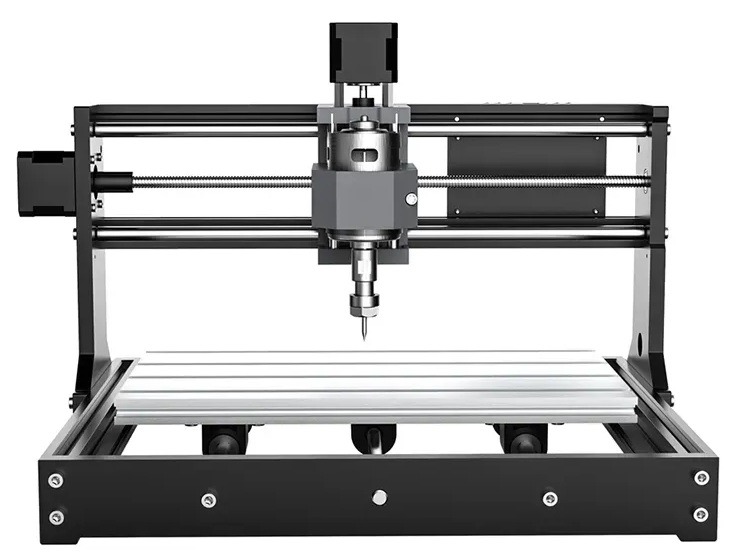
Two Trees 3018 CNC Machine The Two Trees 3018 (often called the 3018-PRO or similar variants) is a compact, affordable entry-level CNC router that gained massive popularity in the global hobbyist and maker community around 2018–2019. Designed primarily as a desktop engraver and light milling machine, it features a 300mm x 180mm working area, making it ideal for beginners tackling PCBs, soft woods, plastics, acrylic, and small aluminum parts.
Its open-source-inspired design, easy assembly, and low cost democratized CNC machining for home workshops. Many users start with the base model for engraving and PCB milling, then upgrade key components (spindle, linear rails, controller, and firmware) as skills grow — exactly why it’s still a favourite starter platform today.
G-Code and M-Code These are the standard "languages" for CNC programming.
- G-Code (Geometric/Preparatory): Controls movement (e.g., G00 rapid traverse, G01 linear feed, G02/G03 arcs, G28 homing). It defines paths, speeds, and coordinates.
- M-Code (Miscellaneous): Handles machine functions (e.g., M03 spindle on clockwise, M08 coolant on, M30 program end). G-code is the core for toolpaths (often generated by CAM software like Fusion 360 or Mastercam from CAD models). M-codes vary more by machine. Both are human-readable text files, but complex programs are usually CAM-generated.
Axes in commercial vs. DIY machines
- DIY/Hobby: Typically 3-axis (X, Y, Z) routers/mills—sufficient for flat work, engraving, or basic parts. Some add A/B rotary for 4/5-axis hobby builds.
- Commercial: 3–5+ axes standard (5-axis common for complex aerospace/medical parts, allowing tool/workpiece rotation). High-end have more for multi-sided machining without repositioning. Rigidity, speed, and precision are far superior in pro machines.
Servos, Steppers, and Others
- Steppers: Common in DIY—precise open-loop control (move in steps), cheap, reliable for lower speeds/loads. Lose steps under high load.
- Servos: Closed-loop (feedback via encoders) for higher speed, torque, accuracy, and error correction. Preferred in commercial for demanding work; more expensive and complex.
- Others: Linear motors or hybrids in high-end. For your DIY interests, steppers are a solid starting point.
Motor Drivers
These translate controller signals into power for motors (current chopping for microstepping/smoothness).
- Hobby: A4988, DRV8825, or better TMC2209 (quiet, high microstepping).
- Pro: Higher-power industrial drivers. They handle heat, current limits, and features like stall detection.
Controllers/CPUs – Internal, USB, or Mach?
- Internal: Dedicated CNC controllers (e.g., industrial Fanuc, Siemens) with built-in processing.
- USB/External: Popular in hobby—GRBL (Arduino-based), or Mach3/Mach4 (PC-based via parallel/USB, Windows). Mach3/4 turns a PC into a controller.
- Modern: LinuxCNC (open-source, flexible), or Ethernet/USB boards. For DIY, GRBL or Mach setups are accessible and low-cost.
How long to become a CNC professional? Training required?
Basics (operator level) can take weeks to months via online/self-paced courses (e.g., Penn Foster ~12 months flexible, or free Titans of CNC). Full machinist/programmer (setup, CAM, troubleshooting) often needs 6–24 months of training + apprenticeship/hands-on. Certifications (e.g., NIMS) help. Costs: $1,000–$4,000+ for programs; vocational colleges or online + shop time.
Do CNC professionals get paid well?
Yes, relatively. In South Africa: ~R95–R170/hour or R350k–R400k/year average (higher in Johannesburg/Cape Town with experience). Globally stronger (US $50k+). Skilled programmers/setup techs earn more; demand is solid in manufacturing.
Advances in the last two decades
- 5-axis/high-speed machining.
- AI/adaptive control (chatter detection, toolpath optimization).
- IoT/connected machines for monitoring.
- Better software (CAM integration), robotics/automation, multi-tasking machines, improved materials/tooling. Tighter tolerances, faster cycles, and hybrid (additive + subtractive) systems.


As an Amazon Associate, Parts-Ring earns from qualifying purchases.
My own Frustrations in Building a CNC Machine
A frustration when using an Arduino was caused by EMI and poor grounding. After doing a few runs with the Arduino and not being happy with the performance due to inconsistency decided to use a controller which ran on 24V, this was the DDCS3.1 – a four axis controller. It is a complete solution loaded from a flash drive and it does not lose memory when there is a power cut. New versions are the DDCS4.1 – all the tricky issues I had with the Arduino disappeared. I believe the Arduino has proven itself because there are hundreds of thousands of users out there but one should definitely use an aluminium or die cast box for the controller. Can you put in your thoughts and add this beneath the 3D printer section and listed under Do It Yourself experiences.
Building Your First CNC: Scratch vs. Kit
When I built my first CNC machine, I constructed it entirely from the ground up, ordering parts piecemeal as needed. While proceeding, I repeatedly read warnings that this route often turns out far more expensive than expected—many designers and builders ended up with costs ballooning to ridiculous levels, sometimes double that of a commercial kit. I can confirm this from personal experience.
Straight off the bat, the absolute best advice is to purchase a kit. For example, the Cron Craft V2 CNC Machine Kit (widely available in South Africa) or a Makerslide-based system. With the mechanicals sorted, you can then choose drivers, steppers, and spindle motor according to your budget for the best performance per rand. Modifications remain simple and cost-effective.
I went with Makerslide (inspired by OpenBuilds V-Slot extrusion systems for linear motion and easy assembly). The version I purchased featured a dual gantry—supposedly for double the strength—but I still found it a weak point. I eventually downsized from a 1200mm x 1200mm footprint to 1200mm x 600mm, and finally settled on a fixed gantry 600mm x 400mm setup. This proved a far more elegant, rigid, and practical solution overall than a full scratch build.
The Cron Craft machines for the South African market often come with electronics included, making them an even stronger turnkey option for local builders.
Makerslide Background (SA Context)
Makerslide was (and is) an open-source linear bearing/extrusion system designed to make DIY CNC machines more accessible and affordable. It builds directly on the OpenBuilds ecosystem (V-Slot and C-Beam profiles pioneered for modular, wheel-based linear rails).
Local supply in South Africa was handled through Makerslide.co.za (active from around 2015 onward, focusing on extrusions and full build components). I believe I dealt with with Phillip de Kock, in that era (mid 2000s) — he was the go to guy for Makerslide/CNC support. I don’t see his website being up any longer and if any reader from South Africa can comment, please do so.
No matter how you approach it, starting with a proven kit saves time, money, and frustration while leaving plenty of room for your signature custom tweaks (e.g., better grounding, 24V upgrades, or integration with your power monitoring projects).
Notes from my Own Experience (CNC/3D Crossover)
My real-world switch from Arduino-based setups highlights common pitfalls and better paths for reliable hobby/prototype work—especially relevant for CNC routers or hybrid builds that overlap with 3D printing workflows.
Many makers start with Arduino (often GRBL firmware on Mega + CNC shield or RAMPS for 3D) because of the massive ecosystem, low cost, and community support—hundreds of thousands of successful installs worldwide. However, EMI (electromagnetic interference) and poor grounding frequently cause inconsistent performance: missed steps, erratic movements, resets, or noisy operation, particularly with stepper motors, long cables, or nearby power tools/inverters.
Of course a big leap forward was moving to a dedicated DDCS3.1 (and newer DDCS4.1) 4-axis controller. Key wins:
- Runs on 24V for better noise immunity and torque.
- Standalone/complete solution—loads G-code from USB flash drive, no constant PC tether.
- Retains memory/settings through power cuts (critical for workshop reliability).
- Resolved the tricky EMI/grounding inconsistencies that plagued the Arduino setup.
Recommendation, and this is a biggie: Even with Arduino ecosystems, enclose the controller in a grounded aluminium or die-cast metal box for shielding. Proper star grounding, twisted-pair wiring, ferrite beads on motor cables, and separating power/signal lines go a long way. For my (and your) style of builds (cost-effective, robust for Parts-Ring prototyping or repairs), the DDCS route offers a nice balance—more “set and forget” than pure microcontroller tinkering while staying accessible. Many users report similar upgrades for CNC mills/routers that double as heavier-duty 3D/CNC hybrid tools. You Tube video shown below.

Cron Craft V1 / V2 CNC Machine The Cron Craft V1 (and updated V2) is a popular South African desktop CNC router designed for makers, hobbyists, and small workshops. Built as a robust entry-level machine with a compact footprint, it offers a practical working/cutting area of approximately 550 x 300mm (Medium model) — with larger variants reaching up to 550 x 800mm. Outer dimensions for the medium model are roughly 887 x 540 x 550mm.
Locally supported and often supplied as a complete kit (including electronics), it provides excellent value and ease of assembly. It serves as an ideal starter platform — users frequently upgrade the spindle, controller, and linear components for improved precision in PCB milling or more demanding tasks.
3D Printing (Additive)
When first used?
Concepts from the 1940s–70s in sci-fi/patents, but practical: 1981 (Hideo Kodama), 1984–86 (Chuck Hull SLA patent—often called the inventor), 1988–89 (SLS/FDM). Commercialized in the late 1980s/90s; exploded with RepRap open-source in the 2000s and consumer printers ~2010s.
G-Code and M-Code
Very similar to CNC! G-code for movements/extrusion (G0/G1 moves, with E for filament), arcs, etc. M-codes for temps (M104/M109 hotend, M140 bed), fans, homing. Sliced from STL/3MF models via Cura/PrusaSlicer. Firmware like Marlin or Klipper interprets it.
Axes – commercial vs DIY
Both typically 3-axis (Cartesian: X/Y gantry, Z bed/layer height) or CoreXY for faster prints. DIY: 3–4 axes common. Commercial/industrial: Similar but with larger builds, multi-material, or advanced kinematics (delta, robotic arms). Pro machines often have better enclosures, auto-leveling, and multi-axis for support-free prints.
Servos, Steppers, Others
Steppers dominate (precise, cheap, open-loop). Servos are rare due to cost/complexity and potential backlash issues in lightweight printers—steppers with good drivers perform excellently for most needs.

Motor Drivers
TMC series (2209, 5160) popular for quiet operation and features. Handle microstepping, current, and stealthChop. Integrated on mainboards.
Controllers/CPUs
- DIY: 8/32-bit boards (Arduino Mega + RAMPS historically; modern SKR, BigTreeTech). Firmware: Marlin (reliable, onboard) or Klipper (offloads to Raspberry Pi for higher speeds/ features).
- Commercial: Proprietary or advanced (e.g., with touchscreens, cloud). USB/SD or networked.
Training to become professional
Shorter curve than CNC for basics—weeks/months self-taught or online (slicing, calibration, troubleshooting). Professional (industrial, design-for-print) may involve courses in CAD, materials, post-processing (6–12+ months). Many certifications via manufacturers. Costs lower, often free resources + printer investment.
Pay for professionals
Additive manufacturing specialists/engineers earn well, especially in design/prototyping/aerospace. SA figures scarcer but competitive with CNC/tech roles (R300k+ for experienced). Globally strong demand in rapid prototyping and custom manufacturing.
Advances last two decades
- Faster printers (high-speed like Bambu Lab), multi-material/color.
- Better materials (engineering resins, metals via SLS/Binder Jetting).
- Large-format, affordable metal printing, AI-optimized slicing/support generation.
- Integration with scanning/CAD, bioprinting, construction-scale. Shift from prototyping to end-use parts.
In Conclusion: Resellers in South Africa
The stores below I have personally purchased from and their service is rock solid.
For local supply (important with import duties/exchange rates):
- 3D Printing Store – 3DPrintingStore.co.za — (Centurion & Boksburg) Major supplier for printers, filaments, resins, parts, and support.
- DIY Electronics – https://www.diyelectronics.co.za/store/ – (Durban) Major supplier for printers, filaments, resins, parts, and support.
- 3D Unique – https://3dunique.co.za/ – Midrand
- Netram Electronics – https://www.netram.co.za/ – Century City
- Next Dimension Electronics – Strand/Somerset West – https://nde3d.co.za/
- Micro Robotics – https://www.robotics.org.za/ – Centurion/Stellenbosch – Parts and Accessories for 3D Printers and CNC Machines
- Others worth checking: Communica, Mantech, or specialist importers for CNC (routers/mills) and 3D (Creality, Prusa, Bambu equivalents). Look for local assembly/support to avoid downtime. For CNC, industrial suppliers or hobby imports via Takealot/Makro.
Makerslide.co.za CNC Machine Assembly Part 1
You Tube Channel: SoundBlab
This video is Part 1 of the process to assemble the Makerslide.co.za CNC Machine.
Forums:
CNC Machines
General DIY & Hobbyist Platforms
- CNCzone: Widely considered the largest and most diverse community, covering everything from DIY router tables to industrial conversions.
- Reddit (r/hobbycnc): One of the most active communities for hobbyists, ideal for sharing project photos and troubleshooting entry-level kits.
- Reddit (r/diycnc): Geared heavily toward scratch-built machines, 3D printing mods, and custom DIY setups.
- Maker Forums: A highly recommended resource specifically for open-source CNC machine designs and electronics.
Open-Source & Community-Driven Projects
- OpenBuilds: A go-to resource and community hub for makers building modular machines from scratch or modifying aluminum extrusion builds.
- Planet CNC: a place where we’ll try to gather all CNC related information that may (or may not) be useful to you, fun and serious projects that might inspire you, you’ll learn what that g-code in your header file does, place that will make you want bigger CNC, lots of technical data, reference information and insider stuff that was lost or hidden before.
- MYCNCUK: An excellent forum tailored for UK-based enthusiasts and global makers discussing open-source designs.
- LinuxCNC Forum: The premier hub for open-source machine controls, which is vital if you are running custom-built hardware.
Brand & Software-Specific Communities
- Shapeoko Forum: An active community for users of Carbide 3D machines and accessories.
- Onefinity CNC Community Forum: Very popular among makers and beginners using desktop or pro-sumer CNC routers.
- Vectric Forum: The best place to discuss design projects, toolpaths, and techniques if you use Vectric software (e.g., VCarve, Aspire).
3D Printers
- Reddit: Features massive communities like r/3Dprinting for general advice and r/FixMyPrint specifically dedicated to troubleshooting failed prints.
- 3D Print Board: A dedicated, traditional forum offering sections for general hardware questions, 3D scanning, and a marketplace for parts and designs.
- UltiMaker Community: A highly active traditional forum that hosts broad 3D printing questions and acts as the central support hub for UltiMaker Cura software.
- Prusa3D Forums: The official forums for Prusa Research users, broken down by specific machine models (e.g., MK4) and open-source slicer software.
- Creality Community Forum: An active space for Creality users to discuss hardware, firmware updates, modifications, and slicing software.
- Voron Design Annex: A very popular Discord and community-driven forum primarily utilized by users who are building and heavily modifying their own high-performance Voron printers.
- Printables: Hosted by Prusa, this community features a rapidly growing forum and platform for sharing models, slicer settings, and printer profiles.
- Thingiverse: Beyond being a large design repository, it features built-in groups and forums where users discuss specific printers and printing techniques.
- Thangs: A model library and collaboration tool that includes community engagement for tracking design updates and printing challenges.
- Facebook Groups: Massive printer-specific groups (such as the BambuLabs 3D Printing Community or various Creality/Anet owner groups) serve as highly localized forums for quick troubleshooting and sharing build pictures.
- Discord: Many advanced hardware communities (like RatRig, VzBot, and Voron) have transitioned from traditional forums to highly active Discord servers for real-time printing assistance.
Further Reading
- Essential Transistors for Beginners: Must-Have Spares, History & Counterfeit Detection (2026) – Part 1
- Power Switching Semiconductors: Thyristors, IGBTs, GTOs, SIDACs & Wide-Bandgap Devices Explained (2026) – Part 2
- Thermionic Valves & Vacuum Tubes: The Enduring Technology Behind Classic Electronics (2026) – Part 3
- FinFET and Gate-All-Around Transistors: Modern 3D Architectures Powering AI & High-Performance Computing (2026) – Part 4
- How Intel Lost Its Way and How They Are Planning to Make a Comeback.
- The Arduino Revolution – From Italian Student Project to Global Maker Powerhouse
Technical Research and Image Credits
- Featured Image: PICRYL. A three dimensional (3D) printer creates a model in the Marine Warrior Library, Marine Corps Air Station Cherry Point, North Carolina, July 15, 2020. 3D printing, material check-outs, scanning and faxing, as well as computer lab services are all still available during the coronavirus pandemic. (U.S. Marine Corps photo by Cpl. Alexandra Santos Arambulo)
- Two Trees CNC Machine – this is the 3018 range (300mm x 180mm). Marketing.
- Cron Craft Vs CNC machine available at 3D Printing Store. Marketing.
- Ultimaker 3D Printer. This file is licensed under the Creative Commons Attribution-Share Alike 3.0 Unported license. Author User:Semenko
- Research: Technical assistance and cross-referencing provided by X’s xAi Grok and Google’s Gemini Ai model.
- Editorial: All case study data, circuit designs, and final editorial decisions are the sole responsibility of the author to ensure technical accuracy