AI CNC DIY is transforming home workshops across South Africa. What used to take days of manual programming, constant babysitting, and costly mistakes can now be done in hours — with far less waste and frustration.
In 2026, AI-powered tools are making CNC milling and 3D printing faster, smarter, and genuinely affordable for the everyday maker. Whether you run a small 6040 router, a basic 3D printer, or an old converted mill, artificial intelligence is turning rigid, error-prone machines into adaptive, self-monitoring systems that learn as they work.
This guide shows you exactly how it works:
- Real-time sensor feedback that adjusts speed, feed, and depth on the fly
- AI vision systems that catch failures before they ruin your material
- Generative design tools that turn a simple sketch or text prompt into optimised G-code in seconds
- Easy Raspberry Pi retrofits that bring modern AI smarts to older machines
The result? Design-to-finished-part times drop dramatically, running costs fall, and you can finally walk away from the machine with confidence instead of hovering nervously.
South African DIYers on tight budgets are already seeing huge gains. A solid mechanical base no longer needs to stay “dumb” — with the right sensors, controller, and a Raspberry Pi brain, even an old 3-axis CNC can run more reliably than many new machines.
Below you’ll find a clear comparison between traditional and AI-enhanced machines, the best ready-to-buy options currently available, and a practical step-by-step guide to retrofitting your existing equipment on a budget.
If you’re tired of failed prints, broken bits, long setup times, and high material waste, this is for you.
Table of Contents
ToggleComparison Table: Traditional "Manual" CNC / 3D Printer vs. AI-Enhanced Machine
| Feature | Traditional Manual CNC / 3D Printer | AI-Enhanced Machine (CNC or 3D Printer) |
|---|---|---|
| Design to G-code / Model Time | Days to hours (manual CAD + CAM programming) | Seconds to minutes (AI generative tools: text, image or sketch → model + optimised toolpaths) |
| G-code Adaptability | Rigid, fixed parameters; no real-time changes | Dynamic: sensors (cameras, LiDAR, force) detect environment, tool wear or workpiece flaws and adapt speed/feed/depth on-the-fly |
| Error Detection & Wastage | Manual monitoring; high failure rates (spaghetti, crashes) | Real-time AI vision + sensors auto-detect, pause and fix issues → 80-90% fewer failed jobs, far less material waste |
| Production Speed & Efficiency | Slower due to constant tweaks and re-runs | Faster overall (optimised paths + unattended runs); fewer errors = higher throughput |
| Autonomy | Requires constant supervision | Fully autonomous runs; AI pauses or shuts down on issues; ready for future robot arm integration |
| Sensors & Predictive Maintenance | Basic or none; reactive fixes | Multiple sensors (30+ in premium models) for monitoring; predicts failures → longer MTBF and component life |
| Learning Curve (Software) | Steep (G-code, manual CAM) | Flattened: AI wizards, auto-calibration and chat-like interfaces make it accessible for beginners |
| Running Costs | Higher (waste, downtime, skilled labour) | Lower (less filament/material waste, energy-efficient adaptive runs) |
| Typical Entry Cost (DIY) | $300–$2,000 (basic kits) | $600–$3,000 (smart models; see examples below) |
Currently Available AI-Enhanced DIY CNC Machines & 3D Printers
True hardware-level AI (onboard cameras, sensors and adaptive processing) is most mature in 3D printing, with CNC catching up fast through smart desktop mills. Here are strong options available right now (2026 prices — check for bundles and local shipping):
3D Printers (Best AI Adoption for Home Use)
- Bambu Lab series (A1 Mini, P1S, X1C, etc.): Industry leaders. Dual AI cameras + LiDAR (on higher models) for spaghetti detection, first-layer inspection, nozzle monitoring and auto-pause. 30+ sensors handle full filament and path monitoring with adaptive flow control. Runs completely unattended and supports multi-colour via AMS. Prices (approx.): A1 Mini ~$219–$329; P1S ~$399–$549 (combo). Why it fits: Massive drop in errors and waste — design-to-print in minutes via their app and AI tools.
- Creality K2 series (K2, K2 Pro, K2 Plus): Strong AI camera monitoring, high-speed CoreXY design and excellent auto-levelling. Great for larger builds and very DIY-friendly. Prices: From ~$699 upwards depending on combo.
CNC Machines (Smart Desktop Options)
- Makera lineup (Z1, Carvera Air, Carvera): Standout for DIY AI CNC. Features Smart Machining Wizard + AI Craft (text/image/sketch → 3D model + toolpaths + G-code). Auto-levelling, closed-loop precision, probing, laser options and enclosed/quiet operation. Dramatically reduces the learning curve. Prices: Z1 entry ~$899–$1,199; Carvera Air ~$2,499; Full Carvera ~$5,499. Why it fits: Real-time hardware adaptation — AI handles the slow software side perfectly.
Software AI Add-Ons (Upgrade Any Machine)
Even with existing gear, tools like Fusion 360 AI features, Carveco AI or CloudNC CAM Assist generate optimised models and toolpaths in seconds. This is often the quickest win for budget-conscious makers.
Robot-assisted full automation (auto part loading) remains industrial/pricey for true DIY (~$5k+ for small cobots) but AI vision makes it increasingly practical.
How AI Dramatically Reduces Lead Time from Design to Final Product
This is the biggest win for home workshops:
- Design Phase (Biggest Time Saver): Traditional CAD/CAM takes days. AI does it in seconds. Upload a photo/sketch or type a prompt (“custom chess piece with engraving”) → AI generates the model + optimised G-code/toolpaths. No advanced CAD skills needed.
- CAM/Programming: AI auto-selects tools, optimises speeds/feeds for your material and simulates to prevent collisions. Hours drop to minutes.
- Production Phase: Real-time adaptation (laser/vision detects flaws or tool wear and adjusts instantly). Fewer re-runs. Unattended operation means you can walk away confidently.
- Overall Impact: Concept to finished part shrinks from days/weeks to hours (sometimes under an hour for simple jobs). Less wastage lowers material costs and speeds up prototyping or small-batch work.
- Extra Gains: Predictive sensors boost MTBF, and the machine learns across runs for even better performance.
Example DIY Workflow: Idea → AI model in Bambu or Makera app → send to machine → AI monitors and adapts → finished part with minimal hands-on time. Perfect for the South African home workshop!
Converting an Old 3-Axis CNC Machine into a Modern AI Machine
One of the most exciting and budget-friendly routes for price-sensitive DIYers is retrofitting an existing 3-axis machine (6040 router, Taig mill, etc.). Many solid mechanical bases just need sensors and a smart brain to gain real-time monitoring, adaptive feeds/speeds, tool-wear detection and autonomous operation.
All recommended products are popular, well-reviewed options on Amazon (our readers’ go-to store).
(1) Essential Sensors & Components (Amazon Picks)



As an Amazon Associate, Parts-Ring earns from qualifying purchases. This page contains affiliate links. Prices and availability are subject to change.
- Vibration/Accelerometer: GY-521 MPU-6050 3-Axis Accelerometer Gyroscope Module (packs available, ~$5–15). Excellent for chatter and tool-wear detection.
- Spindle Load/Current Sensor: ACS712 Current Sensor Module (5A/20A/30A ranges, ~$5–12 each). Ideal for real-time force monitoring and predictive maintenance.
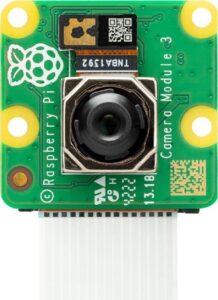
- Vision Camera: Official Raspberry Pi Camera Module 3 or Arducam variants (~$25–50). Great for workpiece inspection and failure detection.
- Touch Probe / Auto Tool Setter: CNC Touch Probe Kits or Z-Axis Tool Setting Probe (~$20–80). Essential for auto-levelling and flaw detection.
- Temperature Sensors: DS18B20 waterproof probes (search “DS18B20 Arduino”, ~$5–10 per pack).
- EMI Suppression (Critical): Clip-on Ferrite Beads/Chokes mixed pack (~$10–15 for 20–60 pieces) for stepper and power cables.
(2) Core Controllers (Amazon Picks)
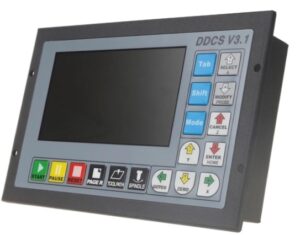
This retrofit works with Arduino and/or DDCS V3.1, but pair it with a Raspberry Pi for proper AI processing.
- DDCS V3.1 Standalone CNC Controller: CNCTOPBAOS or similar 4-Axis Offline models (~$150–250). Reliable with good isolation for old machines.
- Raspberry Pi 5 (The AI Brain): 8GB model or full kits with case/cooler (~$80–250). Runs LinuxCNC + edge AI (OpenCV, TensorFlow Lite).
- Basic Arduino Option: Uno/Mega + CNC shield for simpler sensor reading.
Recommended Hybrid: DDCS V3.1 or GRBL/Arduino for motion control + Raspberry Pi 5 for AI vision, sensor fusion and smart overrides.
(3) Arduino Limitations & Fixes (Amazon Solutions)
Arduino is sensitive to EMI from stepper motors (false triggers, lost steps, corrupted readings). Common fixes available on Amazon:
- Shielded/twisted stepper cables + ferrite beads.
- Optoisolators or use the DDCS V3.1’s built-in isolation.
- Separate 5V logic power supply and proper grounding.
Even with fixes, keep heavy AI (vision/ML) on the Pi for reliability. (My own experience using an Arduino eventually led me to getting a DDCS V3.1 controller – it just eliminated so many problems).
(4) Current DIY Trend (2026)
The community is moving strongly toward Raspberry Pi 5 + LinuxCNC/FluidNC retrofits with sensor fusion and edge AI. Full smart conversions often stay under $300–500. YouTube and r/hobbycnc are packed with 2025–2026 build logs showing 2–5x more reliable unattended runs — perfect for the price-conscious South African maker.
Quick Retrofit Shopping List (Amazon)
- MPU-6050 modules
- ACS712 current sensors
- Raspberry Pi 5 + Camera Module 3
- DDCS V3.1 controller
- CNC touch probe
- Ferrite bead kit